

Your platform for hardware test and measurement.
Write ordinary pytest. Every measurement recorded, checked against spec, and ready to query. Free and open source.
What it takes to test hardware
Mapping product specs to a test plan. Designing stations and selecting instruments. Developing test code across multiple test phases. Verifying measurements against spec-traced limits. Analyzing results in their captured context.
You write the test. TesterKit helps with the rest.
Start simple and get test records immediately
An ordinary pytest test. Your driver, your fixture, plain assert:
def test_rail_within_spec(psu, dmm):
    psu.set_voltage(5.0)
    psu.enable_output()
    assert 3.2 <= dmm.measure_dc_voltage() <= 3.4
Install TesterKit and run it again. It's the same test but this time you have a more structured record.
$ testerkit show 14cfbe7d
Test Run: 14cfbe7d-30d0-4334-b59c-0c04f7576740
  UUT Serial: SN0413
  Outcome: passed
  Started: 2026-07-25T18:39:00-0600
  Steps: 2
  Measurements: 0 (0 failed)

Step Results:
   0. test_rail_within_spec: passed
   1. test_rail_holds_across_input: passed
Traceable history per serial, for nothing. There was an assert in the example3.2 <= v <= 3.4 but you can see that there was no real concept of a measurement.
So let's replace the assertion with a verify method that names a spec, provides limits and judges the measurement value. Now the result includes measurements which you can analyze:
def test_rail_within_spec(psu, dmm, verify):
    psu.set_voltage(5.0)
    psu.enable_output()
    verify("v_rail", dmm.measure_dc_voltage(), limit=V_RAIL)
Same run, now with the reading captured and judged against the spec:
$ testerkit show 14cfbe7d
Test Run: 14cfbe7d-30d0-4334-b59c-0c04f7576740
  UUT Serial: SN0413
  Outcome: passed
  Steps: 2
  Measurements: 1 (0 failed)

Measurements:
  v_rail: 3.31 V [passed]
Every run is persisted on your station. Run testerkit serve from your repository and you get a webpage in your browser to view every result, every reading plotted against limits and every event that occurred during testing:
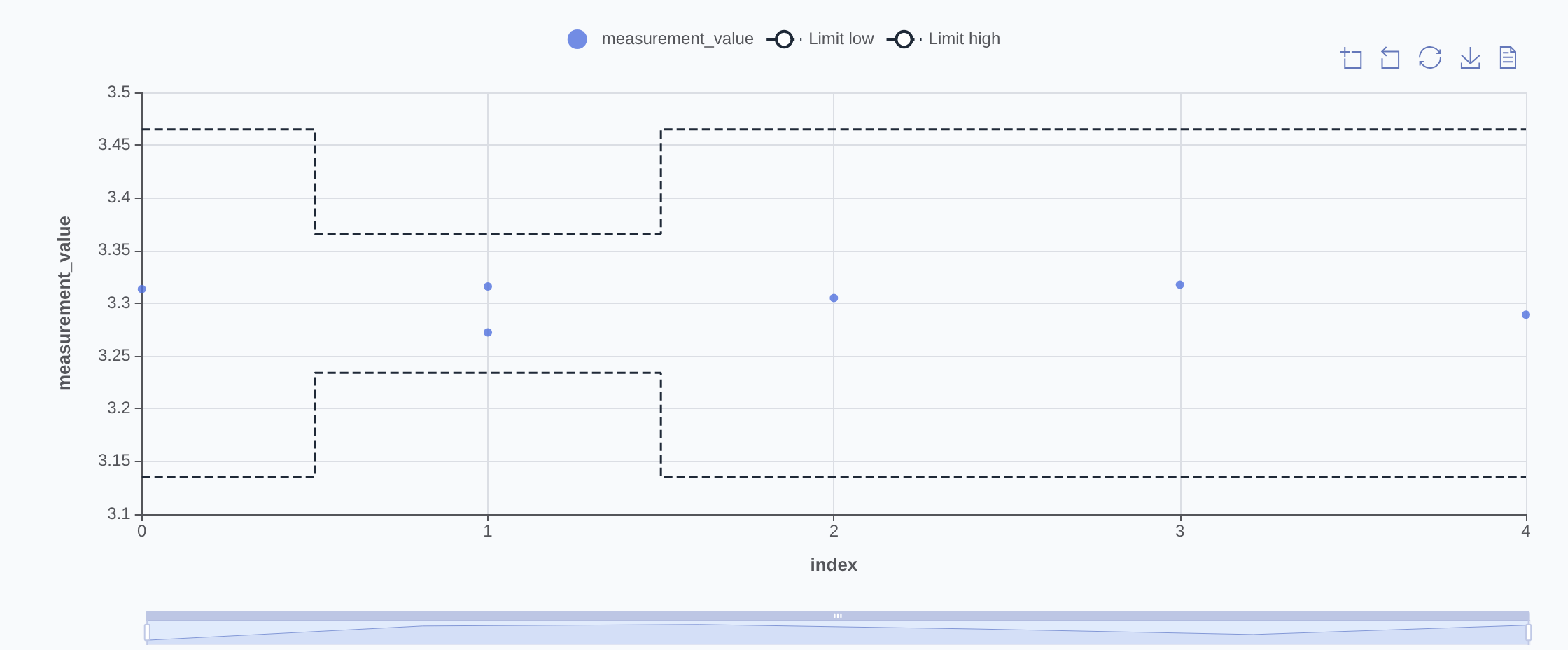
This was the simple path — a single verifycall recording to parquet. The same test body carries you further: limits resolved from a part spec instead of hardcoded, benches declared in station YAML, profiles that separate a dev bench from a production line, waveforms captured alongside the scalar they're judged against, and multiple UUT positions tested in parallel on one bench. None of it is required up front — each stage is one deliberate step past the last.
What you get
Pytest-native start
pytestpasses after install — no server, no account, no hardware. You control your tests, config, and data.Configuration in YAML
Stations, parts, fixtures, profiles. Reviewable on a PR, editable by anything that reads text.
Results you can take anywhere
Every run is a plain file in an open format — query it from DuckDB, Polars, pandas, or Spark, and take it with you if you ever leave.
Operator UI
Browse runs, edit config, launch tests, watch live measurements — all from
testerkit serve.Hand it to your AI agent
Claude Code and Copilot can drive the whole thing — from reading a datasheet to developing tests to execution and debug — all through a built-in MCP server, the CLI, and ready-made workflows.
Principles
Batteries included, easy to integrate
Storage, validation, querying, and a UI come decided and wired together — no stack to assemble to get a working platform. Designed to integrate with other platforms and workflows you already have.
Everything is files
Stations, parts, fixtures, profiles are YAML, tests are Python and data is parquet and arrow files. Reviewable on a PR, easily editable, and portable.
AI-ready, not AI-dependent
Agents can drive every operation through MCP or the CLI. Nothing about the framework requires AI but the design makes it very easy for AI to assist.
Runs anywhere, including offline
Local execution by default. No required server, no required account, no cloud dependency which means it will even work on an air-gapped bench.
Open source, Apache-2.0
The code is yours to read, run, fork, and extend. Easy to use or migrate whenever you decide. The framework uses well-vetted open source dependencies over re-invention wherever possible.
Try it
From nothing to passing tests
pip install testerkit
testerkit init my_project --starter && cd my_project
pytest
Three tests pass against simulated instruments, and their measurements are already recorded and checked against the part spec. No bench required to get here.
Free and open source, Apache-2.0. The PyPI distribution and the Python import are both testerkit.
Or run it in your browser — no install
Open in CodespacesA browser sandbox — mock instruments, the operator UI, analytics, and AI. Real instrument control needs a local install.
Apache-2.0 · pre-1.0 · public on GitHub. APIs may shift before 1.0; pin a version, fork if you have to. Your tests are ordinary pytest; your results are open files on your disk.